

Download Microsoft AZ-140 Sample Questions [Feb-2026]
Real AZ-140 Exam Questions and Answers FREE
NEW QUESTION # 55
Your on-premises network contains an Active Directory domain that syncs with an Azure AD tenant.
You have an Azure Virtual Desktop host pool that contains Windows 11 session hosts joined to the domain.
You need to configure Azure NetApp Files to store user profile containers.
Which four actions should you perform in sequence? To answer, move the appropriate actions from the list of actions to the answer area and arrange them in the correct order.
NOTE: More than one order of answer choices is correct. You will receive credit for any of the correct orders you select.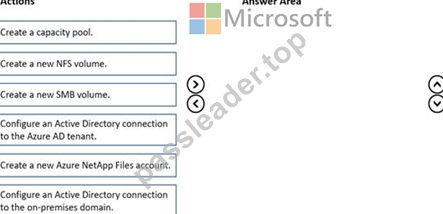
Answer:
Explanation: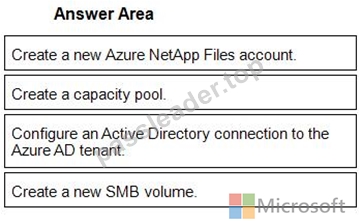
1 - Create a new Azure NetApp Files account.
2 - Create a capacity pool.
3 - Configure an Active Directory connection to the Azure AD tenant.
4 - Create a new SMB volume.
NEW QUESTION # 56
You have an Azure subscription.
You plan to deploy an Azure Virtual Desktop solution that will contain Windows 10 multi-session hosts in a single host pool. The solution has the requirements shown in the following table.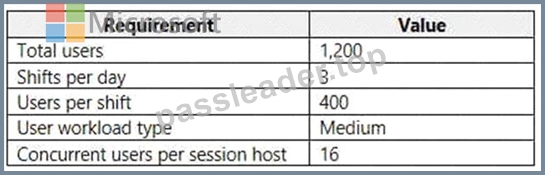
You need to configure the session host for the host pool. The solution must minimize costs.
How many session hosts should the host pool contain, and how many vCPUs should each session host have?
To answer, select the appropriate options in the answer area.
NOTE: Each correct selection is worth one point.
Hot Area: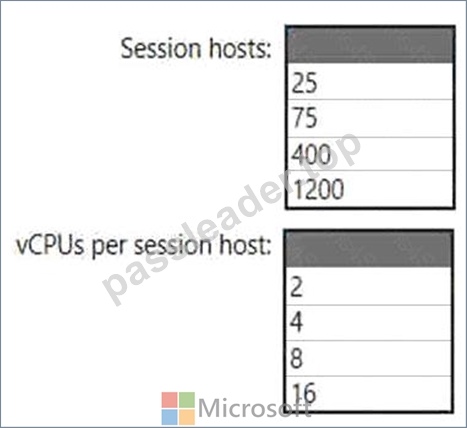
Answer:
Explanation: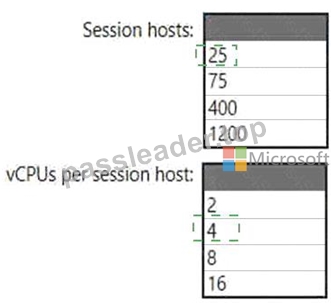
Explanation
Graphical user interface, application, table Description automatically generated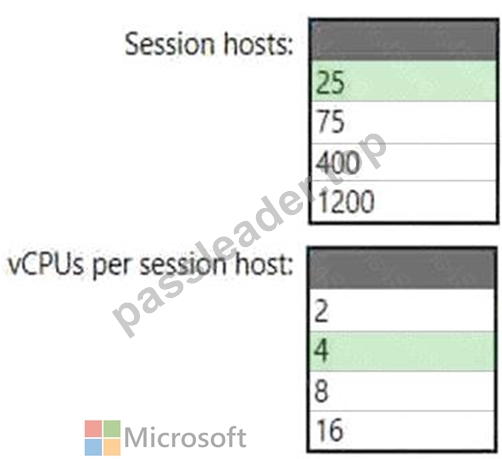
NEW QUESTION # 57
After you answer a question in this section, you will NOT be able to return to it. As a result, these questions will not appear in the review screen.
You have an Azure Virtual Desktop host pool that runs Windows 10 Enterprise multi-session.
User sessions are load-balanced between the session hosts. Idle session timeout is 30 minutes.
You plan to shut down a session host named Host1 to perform routine maintenance.
You need to prevent new user sessions to Host1 without disconnecting active user sessions.
Solution: From the properties of the virtual machine of Host1, you configure the Auto-shutdown settings.
Does this meet the goal?
- A. Yes
- B. No
Answer: B
Explanation:
Reference:
https://docs.microsoft.com/en-us/azure/virtual-desktop/drain-mode
NEW QUESTION # 58
-
You have an Azure Virtual Desktop deployment that contains the session hosts shown in the following table.
You have the users shows in the following table.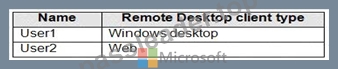
Users connect to Azure from the locations shown in the following table.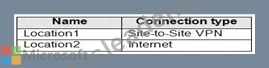
For each of the following statements, select Yes if the statement is true. Otherwise, select No.
NOTE: Each correct selection is worth one point.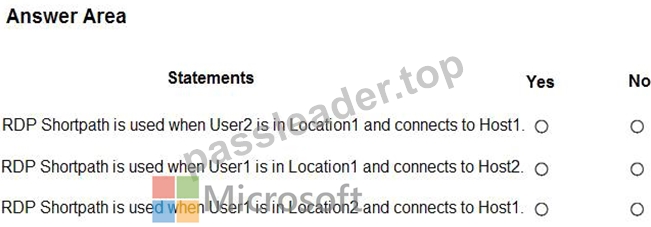
Answer:
Explanation: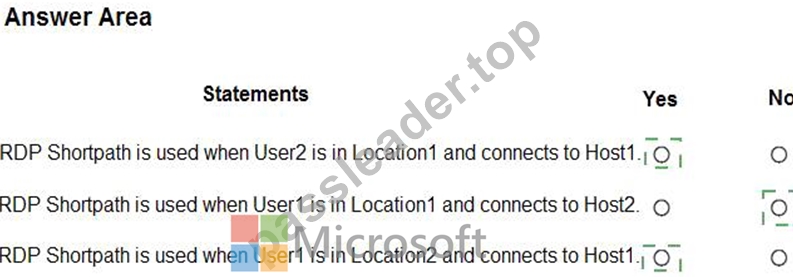
Explanation
Text, letter Description automatically generated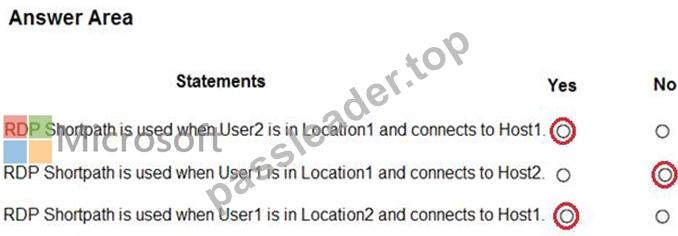
NEW QUESTION # 59
Which users can create Pool4, and which users can join session hosts to the domain? To answer, select the appropriate options in the answer area.
NOTE: Each correct selection is worth one point.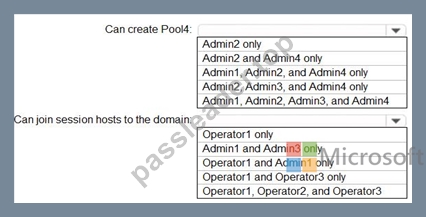
Answer:
Explanation: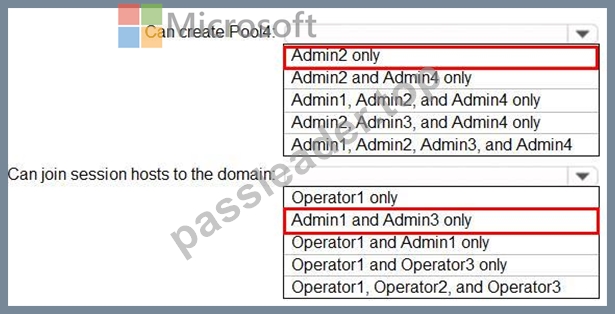
NEW QUESTION # 60
You have an Azure Virtual Desktop deployment that contains a session host named Host1.
You need to configure Windows Defender Firewall to allow inbound network traffic for RDP Shortpath on Host1.
Which program in the C:\Windows\System32 folder should you specify in the inbound firewall rule?
- A. Mstsc.exe
- B. Rdpshell.exe
- C. Raserver.exe
- D. Svchost.exe
Answer: D
Explanation:
New-NetFirewallRule -DisplayName 'Remote Desktop - RDP Shortpath (UDP-In)' -Action Allow -Description 'Inbound rule for the Remote Desktop service to allow RDP Shortpath traffic. [UDP 3390]' -Group '@FirewallAPI.dll,-28752' -Name 'RemoteDesktop-UserMode-In-RDPShortpath-UDP' -PolicyStore PersistentStore -Profile Domain, Private -Service TermService -Protocol UDP -LocalPort 3390 -Program '%SystemRoot%\system32\svchost.exe' -Enabled:True https://learn.microsoft.com/en-us/azure/virtual-desktop/configure-rdp-shortpath?tabs=managed-networks
NEW QUESTION # 61
You have an Azure Virtual Desktop deployment.
You plan to deploy Update Management to manage automated updates for server-based session hosts.
You need to configure the prerequisites for Update Management.
Which two actions should you perform? Each correct answer presents part of the solution.
NOTE: Each correct selection is worth one point.
- A. Enable the Application Insights Agent.
- B. Configure Azure Network Watcher.
- C. Create an Azure Service Health alert rule.
- D. Create a Log Analytics workspace.
- E. Create an Azure Automation account.
Answer: D,E
Explanation:
https://learn.microsoft.com/en-us/azure/architecture/hybrid/azure-update-mgmt
NEW QUESTION # 62
You have an Azure Virtual Desktop deployment that contains the resources shown in the following table.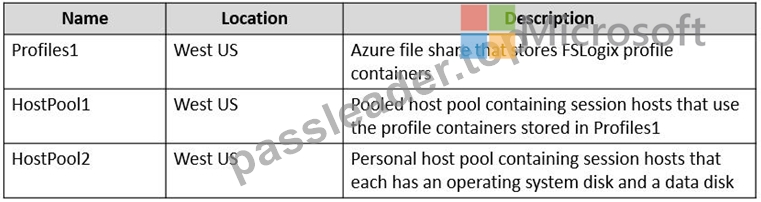
You create the resources shown in the following table.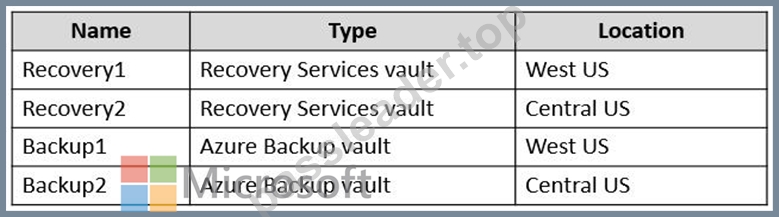
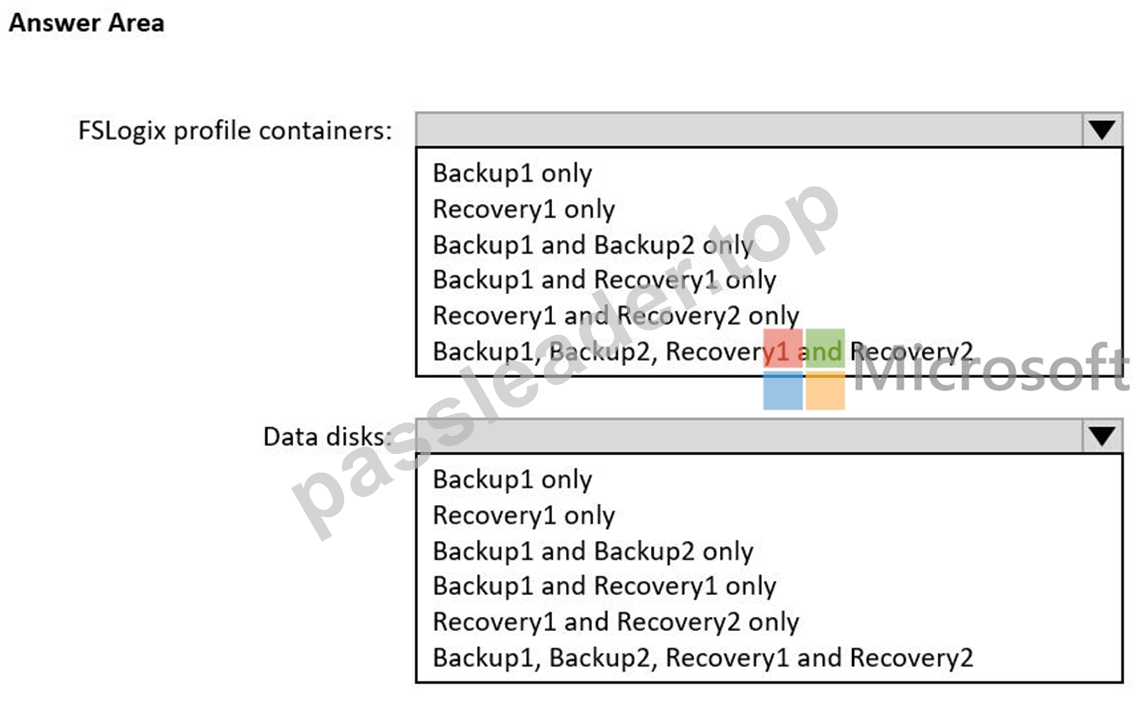
Answer:
Explanation: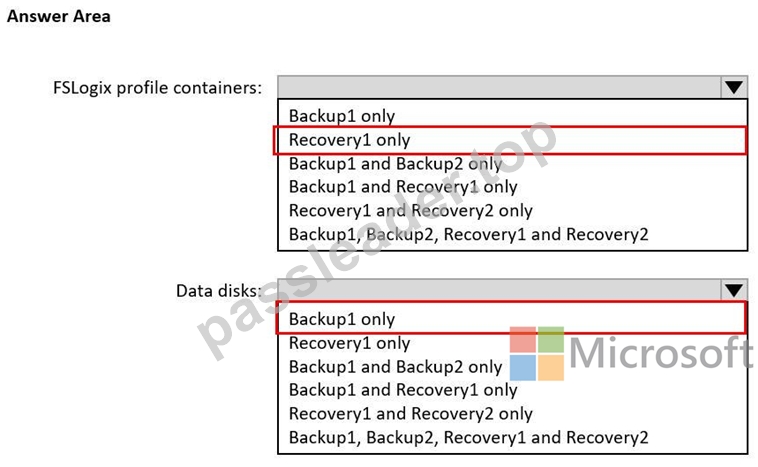
NEW QUESTION # 63
Which role should you assign to Operator2 to meet the technical requirements?
- A. Desktop Virtualization Session Host Operator
- B. Desktop Virtualization Contributor
- C. Desktop Virtualization User Session Operator
- D. Desktop Virtualization Host Pool Contributor
Answer: D
Explanation:
Reference:
https://docs.microsoft.com/en-us/azure/virtual-desktop/rbac
NEW QUESTION # 64
You have an Azure subscription that contains two users named User1 and User2 and the Microsoft Entra groups shown in the following table.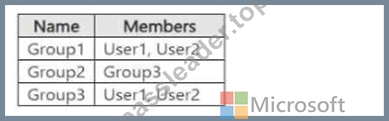
You have an Azure Virtual Desktop host pool named Pool! that contains two session hosts named Host1 and Host2. The session hosts use FSLogix user profiles.
Host1 contains the local groups shown in the following table.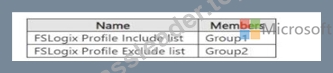
Host2 contains the local groups shown in the following table.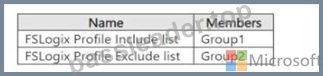
User1 connects to Pool1 and modifies his desktop.
User1 reports that when he reconnects to Pool1, the desktop modifications fail to appear.
You need to ensure that User1 sees the modified desktop when he connects to Pool1. The solution must minimize the impact on other user profiles.
What should you do?
- A. Remove Group2 from both FSLogix Profile Exclude list groups.
- B. Add User1 to both FSLogix Profile Include list groups.
- C. Remove Group3 from Group2.
- D. Remove User1 from Group3.
Answer: C
NEW QUESTION # 65
What should you do to ensure that the session hosts meet the application requirements for App1?
- A. Modify the Connection information settings for the host pool.
- B. Modify the Session behavior settings for the host pool.
- C. Modify the Display settings for the host pool.
- D. Assign a scaling plan to the host pool.
Answer: B
NEW QUESTION # 66
Your network contains an on-premises Active Directory domain that syncs to an Azure Active Directory (Azure AD) tenant. The domain contains the domain controllers shown in the following table.
The DNS servers are configured to forward requests to an external DNS service.
You create a new virtual network named VNET2 that is peered to VNET1 and has gateway transit enabled.
You plan to implement an Azure Virtual Desktop host pool in VNET2. The session hosts will be joined to the Active Directory domain.
You need to configure DNS to meet the following requirements:
Ensure that Azure Virtual Desktop users can resolve on-premises servers and Azure resources.
Ensure that azure Virtual Desktop remains operational if a DNS server fails.
Minimize administrative effort.
What should you configure?
- A. the DNS settings of VNET2 to use Server2 and Served
- B. the DNS settings of the virtual machines to use the Azure DNS service
- C. the DNS settings of the virtual machines to use Server2 and Server1
- D. the DNS settings of VNET2 to use the Azure DNS service
Answer: C
Explanation:
Reference:
https://docs.microsoft.com/en-us/azure/virtual-network/virtual-networks-name-resolution-for-vms-and-role-instances#name-resolution-that-uses-your-own-dns-server
NEW QUESTION # 67
You have a Azure Virtual Desktop deployment.
In Azure Advisor, you discover the following recommendation related to Azure Virtual Desktop:
* Impact Medium
* Description: No validation environment enabled
* Potential Benefit Ensure business continuity through AVD service deployments
* Impacted Resource:' Host Pool
What can you validate by implementing the recommendations?
- A. Capacity requirements of the session hosts
- B. Preview features for Azure Virtual Desktop
- C. Azure Site Recovery failover of the session hosts
- D. Security settings of Azure Virtual Desktop
Answer: C
Explanation:
Reference:
https://docs.microsoft.com/en-us/azure/virtual-desktop/azure-advisor-recommendations
https://docs.microsoft.com/en-us/azure/virtual-desktop/disaster-recovery
NEW QUESTION # 68
You have an Azure subscription that contains the virtual machines shown in the following table.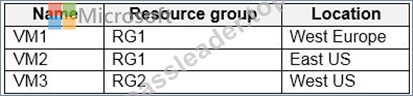
You create a shared image gallery as shown in the SharedGallery1 exhibit. (Click the SharedGallery1 tab.)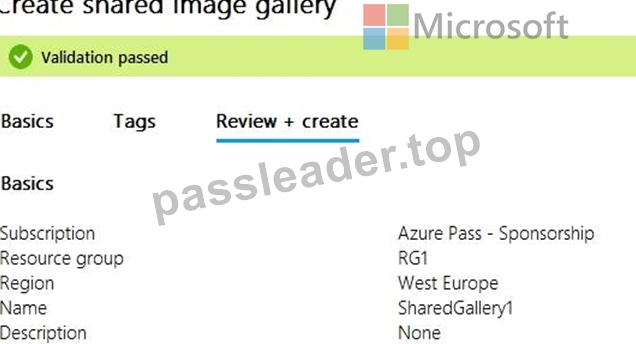
You create an image definition as shown in the Image1 exhibit. (Click the Image1 tab.)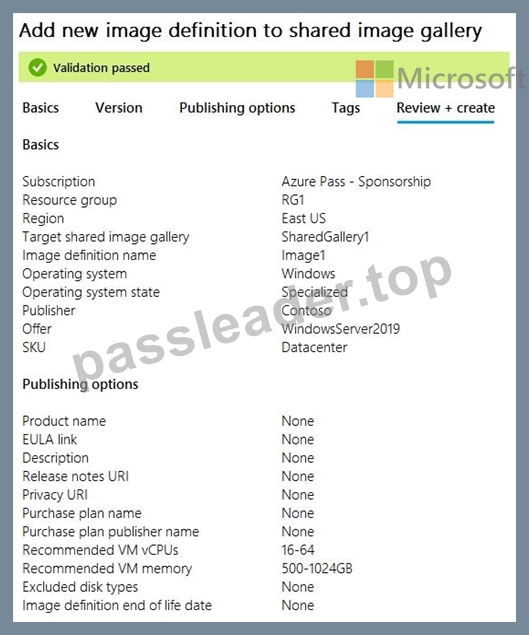
For each of the following statements, select Yes if the statement is true. Otherwise, select No.
NOTE: Each correct selection is worth one point.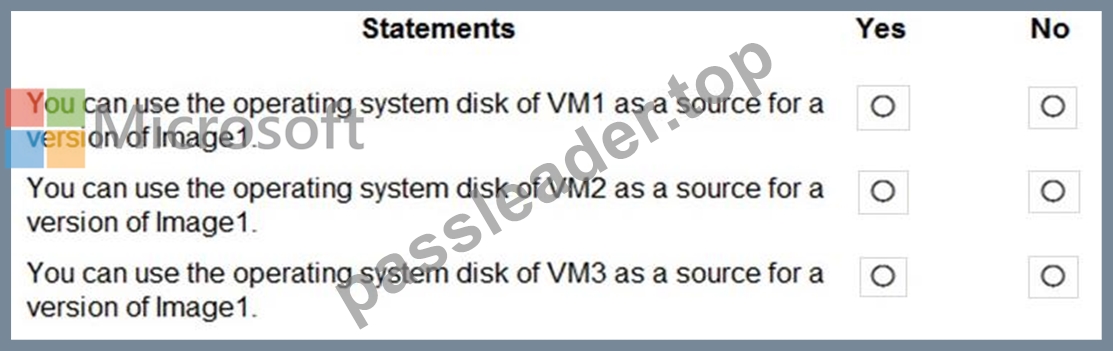
Answer:
Explanation: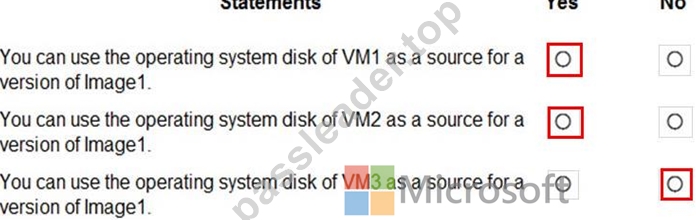
Reference:
https://www.robinhobo.com/windows-virtual-desktop-wvd-image-management-how-to-manage-and-deploy-custom-images-including-versioning-with-the-azure-shared-image-gallery-sig/
NEW QUESTION # 69
You have an Azure subscription that contains the resources shown in the following table.
You need to ensure that users can restore files saved to their FSLogix profile.
What should you do?
- A. From the CPool1 blade in the Azure portal, create a new volume.
- B. From the Azure portal, create an Azure Backup vault and a backup policy.
- C. From the Azure portal, create a Recovery Services vault and a backup policy.
- D. From the Volume1 blade in the Azure portal, create a snapshot policy.
Answer: C
Explanation:
From the docs: Azure Files Premium tier integrates with Azure Backup and is supported in conjunction with FSLogix. Azure NetApp Files offers a similar snapshot mechanism to make copies of your FSLogix profile containers.
https://learn.microsoft.com/en-us/azure/architecture/example-scenario/wvd/windows-virtual-desktop-fslogix#bac
NEW QUESTION # 70
You have an Azure Virtual Desktop host pool.
You add a French language pack to each session host in the host pool.
Several days later, users report that English displays when they connect to Azure Virtual Desktop.
After an investigation, you discover that the French language pack was removed, and the session hosts reverted to English.
You need to ensure that the French language pack is always available on the session hosts.
What should you do?
- A. Apply a Group Policy setting to disable the Time & language settings.
- B. Configure the international settings on each host.
- C. Assign a default time zone on each host.
- D. Apply a Group Policy setting that blocks the cleanup of unused language packs.
Answer: A
Explanation:
Explanation
https://docs.microsoft.com/en-us/windows-hardware/manufacture/desktop/languages-overview?view=windows-1
NEW QUESTION # 71
You have an Azure Virtual Desktop deployment.
You need to add a new application for a RemoteApp application group. The application must be available only during a user session.
What should you use as an application source?
- A. app attach
- B. file path
- C. start menu
- D. FSLogix Profile Container
Answer: A
NEW QUESTION # 72
You have an Azure Virtual Desktop host pool named Pool1. Pool1 contains session hosts that have a third-party application named App1. App1 is published by using a RemoteApp group.
A new MSI-based version of App1 is installed each month to each host. The name of the executable file is different for each version of App1.
You need to automate the process of making a new version of App1 available via RemoteApp.
The process must ensure that the user experience remains the same when launching the application from the Windows Desktop client.
Which two cmdlets should you run? Each correct answer presents part of the solution.
NOTE: Each correct selection is worth one point.
- A. Remove-AzWvdApplication
- B. New-AzRoleAssignment
- C. New-AzWvdMsixPackage
- D. New-AzWvdApplication
- E. Remove-AzWvdMsixPackage
- F. New-AzWvdApplicationGroup
Answer: A,D
Explanation:
MSIX = Containerized applications without installing the applications on the session hosts.
Question states - A new MSI-based version of App1 is installed each month to each host, thus
"New-AzWvdMsixPackage" is not even considered in this scenario.
NEW QUESTION # 73
You have an Azure subscription that contains the virtual machines shown in the following table.
You create a shared image gallery as shown in the SharedGallery1 exhibit. (Click the SharedGallery1 tab.)
You create an image definition as shown in the Image1 exhibit. (Click the Image1 tab.)
For each of the following statements, select Yes if the statement is true. Otherwise, select No.
NOTE: Each correct selection is worth one point.
Answer:
Explanation: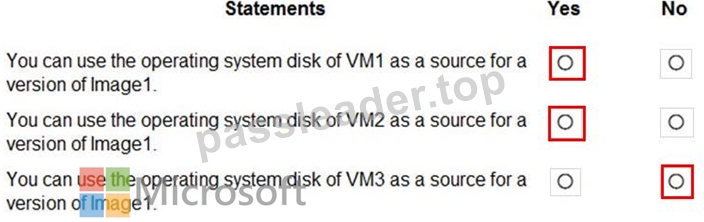
Reference:
https://www.robinhobo.com/windows-virtual-desktop-wvd-image-management-how-to-manage-and-deploy-custom-images-including-versioning-with-the-azure-shared-image-gallery-sig/
NEW QUESTION # 74
Note: This question is part of a series of questions that present the same scenario. Each question in the series contains a unique solution that might meet the stated goals. Some question sets might have more than one correct solution, while others might not have a correct solution.
After you answer a question in this section, you will NOT be able to return to it. As a result, these questions will not appear in the review screen.
You have an Azure Virtual Desktop host pool that runs Windows 10 Enterprise multi-session.
User sessions are load-balanced between the session hosts. Idle session timeout is 30 minutes.
You plan to shut down a session host named Host1 to perform routine maintenance.
You need to prevent new user sessions to Host1 without disconnecting active user sessions.
Solution: From the host pool, you remove Host1 from the session host list.
Does this meet the goal?
- A. Yes
- B. No
Answer: B
Explanation:
Reference:
https://docs.microsoft.com/en-us/azure/virtual-desktop/drain-mode
NEW QUESTION # 75
You have an Azure Virtual Desktop deployment that uses Azure Active Directory Domain Services (Azure AD DS). You have the following host pool:
* Name: Pool1
* Type: Personal
* Number of session hosts: 5
You plan to deploy two new session hosts to Pool1. What should you do before you deploy the session hosts?
- A. Increase the maximum session limit.
- B. Create a scaling plan.
- C. Create a registration key.
- D. Precreate a computer account in Azure AD DS.
Answer: D
Explanation:
This is done by using the Add-AzDomainComputer cmdlet in PowerShell. After the computer accounts have been created, the new session hosts can be deployed. For more information, please refer to the following Microsoft documentation: https://docs.microsoft.com/en-us/azure/virtual-desktop/create-session-host-pools#precreate-comp
NEW QUESTION # 76
You are automating the deployment of an Azure Virtual Desktop host pool.
You deploy the Azure Resource Manager (ARM) template shown in the following exhibit.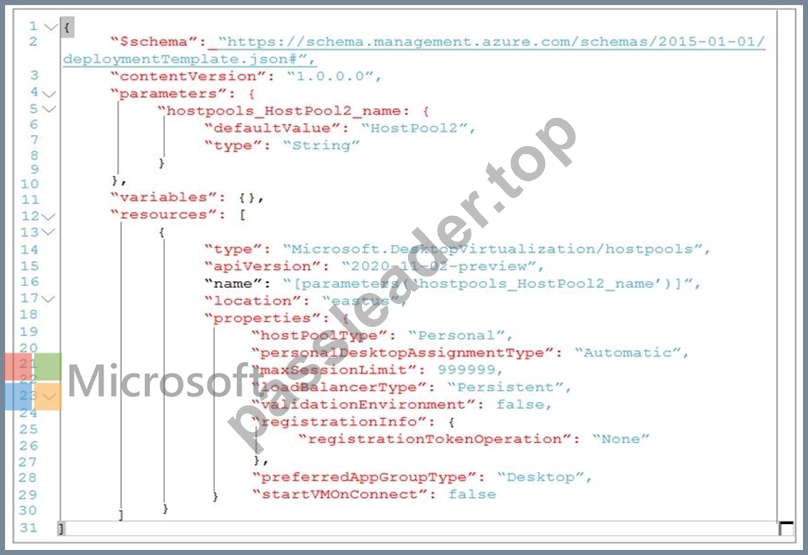
Use the drop-down menus to select the answer choice that completes each statement based on the information presented in the Dockerfile.
NOTE: Each correct selection is worth one point.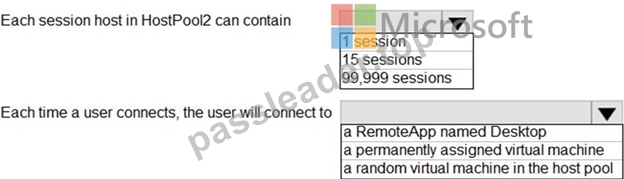
Answer:
Explanation: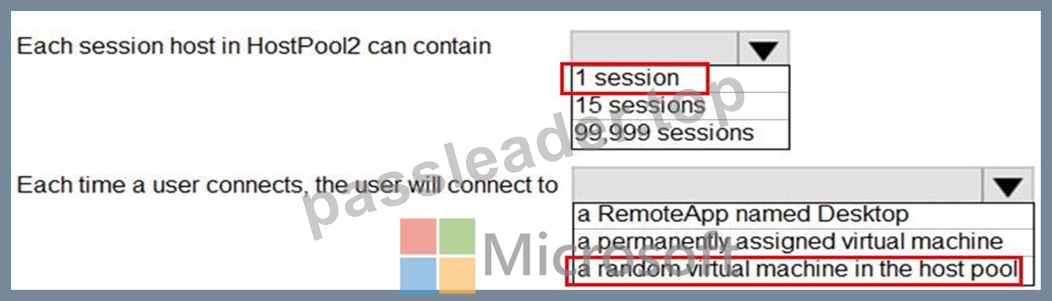
Reference:
https://docs.microsoft.com/en-us/azure/virtual-desktop/virtual-desktop-fall-2019/configure-host-pool-personal-desktop-assignment-type-2019
NEW QUESTION # 77
You have an Azure Virtual Desktop deployment that contains a host pool named Pool1. Pool1 contains two session hosts. Pool1 is configured as shown in the following exhibit.
Use the drop-down menus to select the answer choice that completes each statement based on the information presented in the graphic.
NOTE- Each correct selection is worth one point.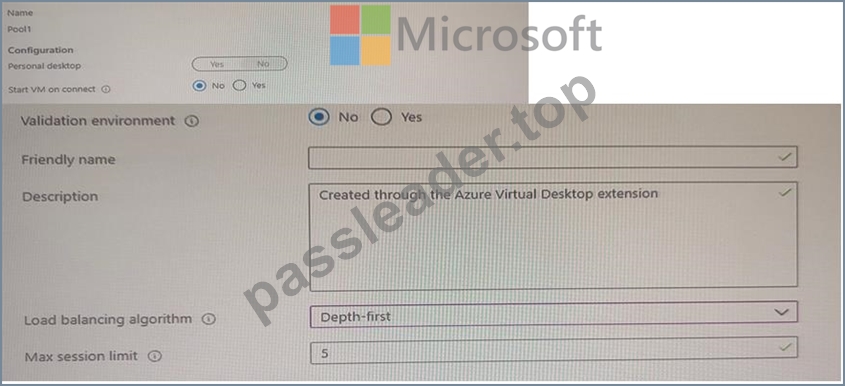
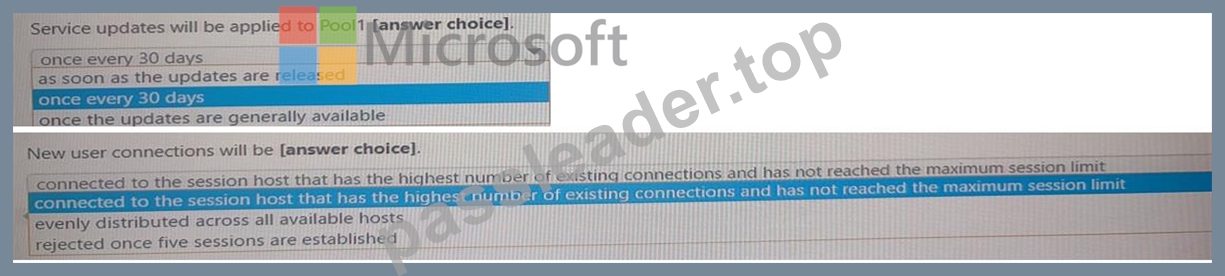
Answer:
Explanation: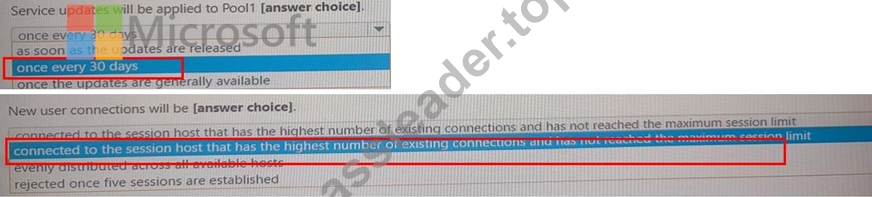
NEW QUESTION # 78
You have a Windows Virtual Desktop deployment.
You have a session host named Host1 that has the disk layout shown in the exhibit. (Click the Exhibit tab.)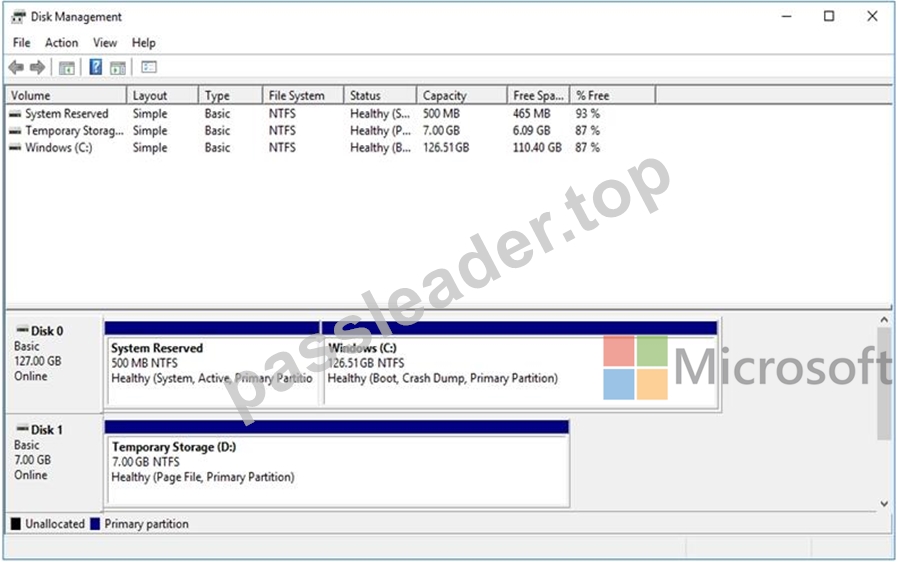
You plan to deploy an app that must be installed on D. The app requires 500 GB of disk space.
You need to add a new data disk that will be assigned the drive letter D. The solution must maintain the current performance of Host1.
Which four actions should you perform in sequence? To answer, move the appropriate actions from the list of actions to the answer area and arrange them in the correct order.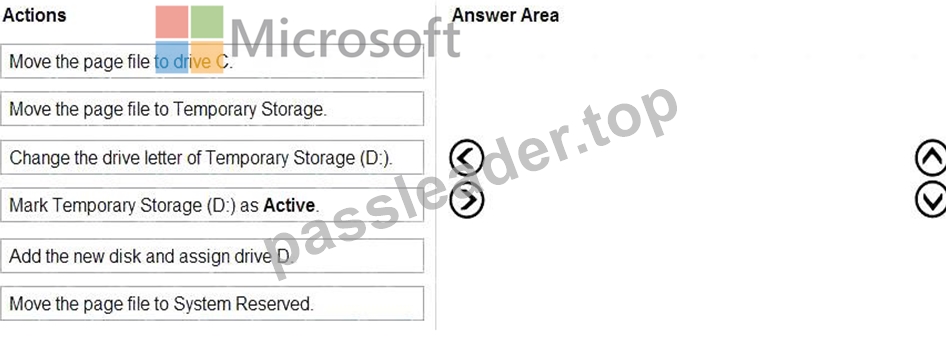
Answer:
Explanation: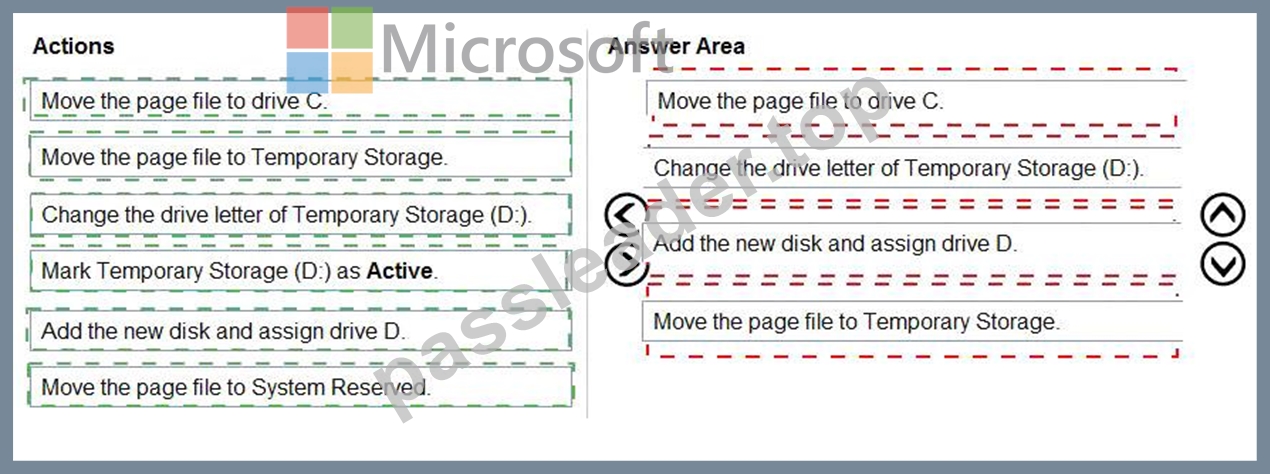
Explanation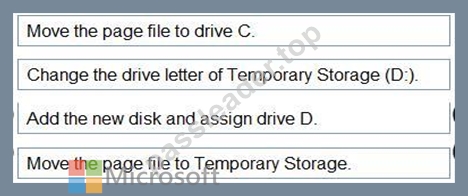
Reference:
https://www.azurecorner.com/change-temporary-drive-azure-vm-use-d-persistent-data-disks/
NEW QUESTION # 79
You have an Azure Virtual Desktop host pool. The pool contains session hosts that run Windows 10 Enterprise multi-session.
You connect to a Remote Desktop session on Pool1 and discover an issue with the frequency of screen updates.
You need to identify whether the issue related to insufficient server, network, or client resources. The solution must minimize how long it takes to identify the resource type.
What should you do?
- A. From Azure Cloud Shell, run the Get-AzWvdUserSession cmdlet and specify the UserSessionId parameter.
- B. From within the current session, use the Azure Virtual Desktop Experience Estimator.
- C. From within the current session, use Performance Monitor to display the values of all the RemoteFX Graphics(*)\Frames Skipped/Second counters.
- D. From Azure Cloud Shell, run the
Get-AzOperationalInsightsWorkspaceUsage cmdlet and specify the DefaultProfile parameter.
Answer: C
Explanation:
Reference:
https://docs.microsoft.com/en-us/azure/virtual-desktop/remotefx-graphics-performance-counters
Topic 1, Litware, Inc
Case study
This is a case study. Case studies are not timed separately. You can use as much exam time as you would like to complete each case. However, there may be additional case studies and sections on this exam. You must manage your time to ensure that you are able to complete all questions included on this exam in the time provided.
To answer the questions included in a case study, you will need to reference information that is provided in the case study. Case studies might contain exhibits and other resources that provide more information about the scenario that is described in the case study. Each question is independent of the other questions in this case study.
At the end of this case study, a review screen will appear. This screen allows you to review your answers and to make changes before you move to the next section of the exam. After you begin a new section, you cannot return to this section.
To start the case study
To display the first question in this case study, click the button. Use the buttons in the left pane to explore the content of the case study before you answer the questions. Clicking these buttons displays information such as business requirements, existing environment, and problem statements. If the case study has an All Information tab, note that the information displayed is identical to the information displayed on the subsequent tabs. When you are ready to answer a question, click the button to return to the question.
Overview
Litware, Inc. is a pharmaceutical company that has a main office in Boston, United States, and a remote office in Chennai, India.
Existing Environment. Identity Environment
The network contains an on-premises Active Directory domain named litware.com that syncs to an Azure Active Directory (Azure AD) tenant named litware.com.
The Azure AD tenant contains the users shown in the following table.
All users are registered for Azure Multi-Factor Authentication (MFA).
Existing Environment. Cloud Services
Litware has a Microsoft 365 E5 subscription associated to the Azure AD tenant. All users are assigned Microsoft 365 Enterprise E5 licenses.
Litware has an Azure subscription associated to the Azure AD tenant. The subscription contains the resources shown in the following table.
Litware uses custom virtual machine images and custom scripts to automatically provision Azure virtual machines and join the virtual machines to the on-premises Active Directory domain.
Network and DNS
The offices connect to each other by using a WAN link. Each office connects directly to the internet.
All DNS queries for internet hosts are resolved by using DNS servers in the Boston office, which point to root servers on the internet. The Chennai office has caching-only DNS servers that forward queries to the DNS servers in the Boston office.
Requirements. Planned Changes
Litware plans to implement the following changes:
* Deploy Windows Virtual Desktop environments to the East US Azure region for the users in the Boston office and to the South India Azure region for the users in the Chennai office.
* Implement FSLogix profile containers.
* Optimize the custom virtual machine images for the Windows Virtual Desktop session hosts.
* Use PowerShell to automate the addition of virtual machines to the Windows Virtual Desktop host pools.
Requirements. Performance Requirements
Litware identifies the following performance requirements:
* Minimize network latency of the Windows Virtual Desktop connections from the Boston and Chennai offices.
* Minimize latency of the Windows Virtual Desktop host authentication in each Azure region.
* Minimize how long it takes to sign in to the Windows Virtual Desktop session hosts.
Requirements. Authentication Requirements
Litware identifies the following authentication requirements:
* Enforce Azure MFA when accessing Windows Virtual Desktop apps.
* Force users to reauthenticate if their Windows Virtual Desktop session lasts more than eight hours.
Requirements. Security Requirements
Litware identifies the following security requirements:
* Explicitly allow traffic between the Windows Virtual Desktop session hosts and Microsoft 365.
* Explicitly allow traffic between the Windows Virtual Desktop session hosts and the Windows Virtual Desktop infrastructure.
* Use built-in groups for delegation.
* Delegate the management of app groups to CloudAdmin1, including the ability to publish app groups to users and user groups.
* Grant Admin1 permissions to manage workspaces, including listing which apps are assigned to the app groups.
* Minimize administrative effort to manage network security.
* Use the principle of least privilege.
Requirements. Deployment Requirements
Litware identifies the following deployment requirements:
* Use PowerShell to generate the token used to add the virtual machines as session hosts to a Windows Virtual Desktop host pool.
* Minimize how long it takes to provision the Windows Virtual Desktop session hosts based on the custom virtual machine images.
* Whenever possible, preinstall agents and apps in the custom virtual machine images.
NEW QUESTION # 80
......
Truly Beneficial For Your Microsoft Exam: https://www.passleader.top/Microsoft/AZ-140-exam-braindumps.html
View All AZ-140 Actual Exam Questions, Answers and Explanations for Free: https://drive.google.com/open?id=1qlbolLFwxBBTOCP7MicnZRCSji4GKzFU